Enterprise Solutions · Architecture
Workflow Orchestration — Azure Logic Apps
Defines when Azure Logic Apps should orchestrate connector-driven workflows across cloud, on-premises, B2B, approvals, and scheduled business processes.
Document class: Enterprise architecture reference model Normative terms: MUST, MUST NOT, SHOULD, SHOULD NOT, and MAY are requirements levels. Applicability: Multistep integration processes that are primarily connector-driven and require control flow, retries, approvals, schedules, or B2B processing. Exception process: Deviations require a documented risk assessment, compensating controls, named risk owner, and expiry date.
| Control field | Value |
|---|---|
| Document ID | ES-04 |
| Owner | Cloud Center of Excellence |
| Review cycle | At least annually and after material Logic Apps runtime, connector, identity, network, integration-account, or workflow-hosting changes |
| Evidence | Workflow definition, connector and connection inventory, identity and network review, contract tests, failure tests, deployment artifact, and operational readiness review |
Decision in brief: Use Logic Apps when connector-driven coordination is the main problem. Keep custom code, durable messaging, governed APIs, and large-scale data processing in their proper boundaries.
Purpose
This architecture uses Azure Logic Apps as the controlled workflow engine for multistep integrations where the primary work is connecting systems and coordinating control flow. A workflow can be triggered by a request, event, message, file, schedule, or connector-specific event, then execute actions such as calls, conditions, loops, transformations, approvals, notifications, retries, and compensating steps.
Use Logic Apps for SAP-to-SaaS workflows, SFTP file processing, approval and notification workflows, B2B integration using EDI, X12, EDIFACT, or AS2, cloud-to-on-premises database integration, and scheduled business processes. Microsoft describes the managed connector ecosystem as containing more than 1,400 connectors, subject to service and connector availability changes. Connector overview
Logic Apps is an orchestration and integration boundary, not an application runtime or a general-purpose data-processing engine. A workflow SHOULD coordinate explicit steps and contracts; it MUST NOT accumulate substantial business logic, become a substitute for durable messaging, or be used for large analytical data transformations. Put custom code in Functions or an application runtime, durable business messages in Service Bus, governed synchronous API access in API Management, and analytical movement or transformation in a data platform.
Scope and design outcomes
Use this model when a workload needs to:
- connect multiple systems through managed or custom connectors;
- express a visible, auditable sequence of triggers, actions, conditions, loops, branches, scopes, retries, and compensating actions;
- coordinate cloud services, SaaS applications, on-premises systems, private networks, and B2B partners;
- process files arriving through SFTP, file shares, or object storage;
- route approvals, notifications, or human-in-the-loop decisions;
- exchange standardized B2B documents and apply partner-specific agreements, maps, schemas, and certificates;
- run a business process on a schedule with defined lateness, overlap, and recovery behavior; or
- call a bounded Function, API, Service Bus entity, or data service when configuration alone is insufficient.
The target outcomes are:
- every workflow has a business owner, technical owner, purpose, trigger, dependency inventory, data classification, and support path;
- workflows are decomposed into readable, testable steps with explicit contracts and named failure paths;
- identity, connector connections, private networking, and secrets are managed independently of workflow logic;
- transient failures are retried with bounded policy and permanent failures are quarantined or routed to an actionable exception path;
- workflow runs, business correlation, connector calls, and external side effects are traceable without exposing sensitive payloads;
- Standard, Consumption, or hybrid hosting is selected from requirements rather than habit; and
- large analytical transformations are performed by a data-engineering platform rather than by a connector workflow.
Context and decision drivers
Enterprise integrations commonly span systems with different protocols, ownership models, data formats, availability targets, and network locations. A direct chain of custom calls can hide the process definition inside application code, make partner changes expensive, and leave operations teams without a clear view of the current step or recovery path.
The decision is driven by:
- Connector coverage: The process benefits from supported connectors for SaaS, databases, file transfer, messaging, APIs, and enterprise protocols.
- Process visibility: Operators and reviewers need to see the trigger, control flow, action outcomes, retries, and failure branches as a workflow rather than infer them from application logs.
- Hybrid reach: The workflow must cross cloud, on-premises, private-network, or partially connected boundaries with an approved connectivity pattern.
- Business coordination: The process includes approvals, notifications, scheduled steps, human decisions, or partner-specific behavior.
- Reliability: The process needs durable run state, controlled retries, timeouts, compensation, replay or resubmission, and operational evidence.
- Change velocity: Connector configuration, mapping, partner agreements, and workflow steps should be independently versioned and promoted.
- Security and governance: Connections, identities, secrets, data access, network paths, and diagnostic retention require centralized control.
- Workload fit: The work is orchestration with bounded transformations, not large-scale analytical ingestion or arbitrary application execution.
Options considered
Custom code in Azure Functions
Use Serverless Custom Integration — Azure Functions when a connector or workflow expression is insufficient and actual code is required for validation, transformation, protocol adaptation, event handling, scheduled execution, or a lightweight HTTP endpoint. Functions should remain a bounded execution component called by or calling the workflow; a large function method should not conceal a multistep business process.
Azure Service Bus
Use Enterprise Messaging — Azure Service Bus when the primary requirement is durable business messaging: queues, topics, subscriptions, dead-letter queues, duplicate detection, scheduled delivery, sessions, ordered processing, or broker transactions. Logic Apps MAY consume or publish Service Bus messages, but it does not replace broker durability or consumer idempotency.
API Management
Use API-Led Integration — Azure API Management as the governed front door for internal, partner, and public APIs. Logic Apps can implement a workflow behind an API or call APIs through a connector, but authentication policy, rate limits, quotas, API discovery, and consumer governance belong at the API boundary.
Azure Data Factory, Fabric, Synapse, or another data platform
Use Azure Data Factory and Data Integration or an approved analytical platform for large data movement, bulk ingestion, analytical transformations, data-quality pipelines, and workload-scale joins or aggregations. Logic Apps can start, monitor, or notify about such a pipeline, but it is not the correct engine for the transformation itself.
Direct application-to-application calls
Direct calls can be appropriate for a small synchronous interaction with a clear latency budget and a single owning application. They become difficult to govern when the process has multiple dependencies, asynchronous steps, partner-specific variants, approvals, schedules, or recovery branches. In those cases, move coordination into an explicit Logic Apps workflow or another purpose-fit orchestrator.
Selected direction: Azure Logic Apps
Use Logic Apps when integration is primarily a multistep process involving connectors and control flow. Select Standard when private networking, multiple workflows per resource, single-tenant runtime control, predictable operational behavior, or hybrid deployment is important. Select Consumption for simpler workflows where multitenant hosting, one workflow per resource, and pay-per-execution billing are a better fit. Review current service limits, connector behavior, pricing, regional availability, and data-residency requirements before standardizing the hosting choice.
Reference architecture
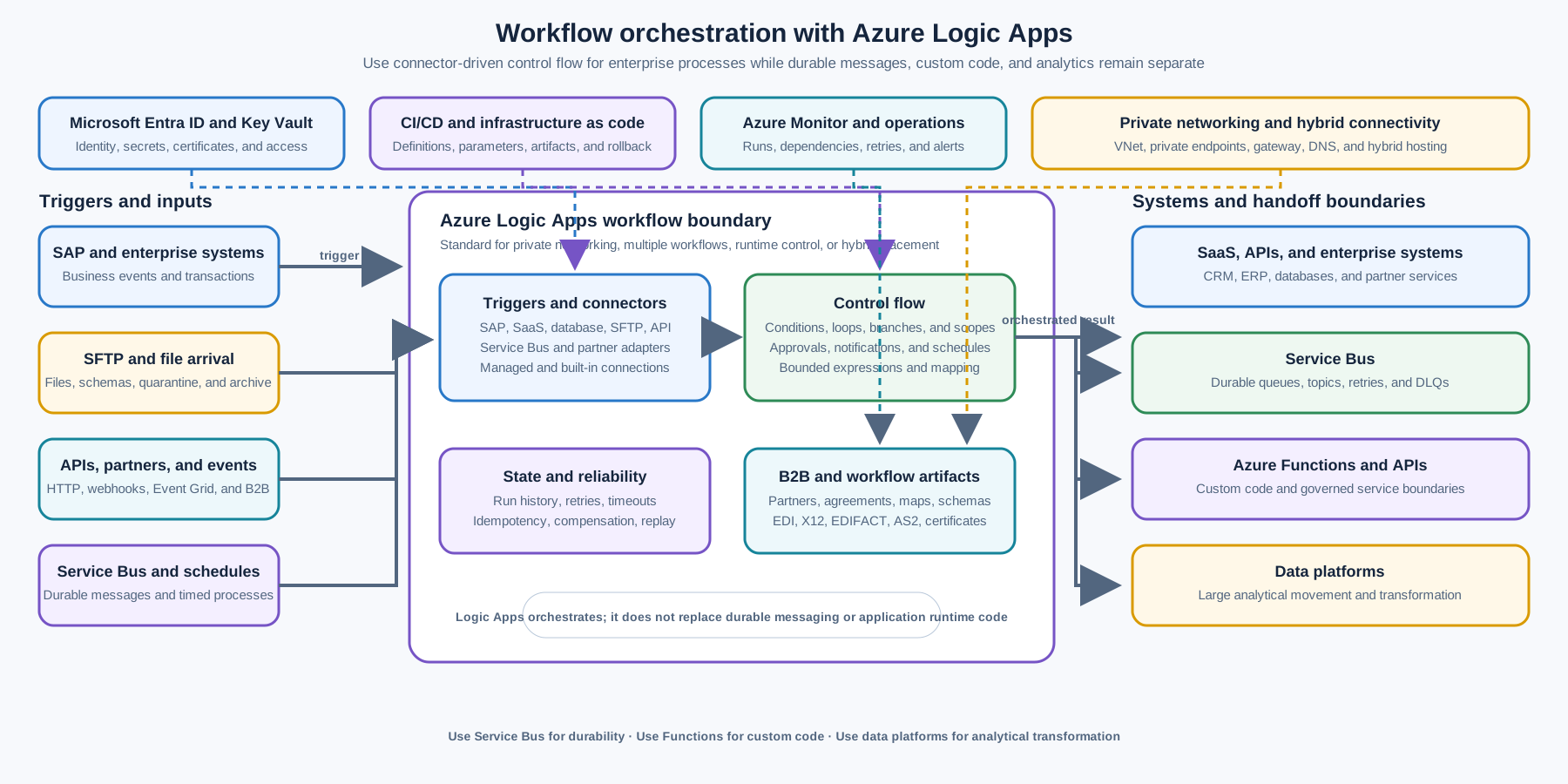
Sources such as SAP, SFTP, partner endpoints, APIs, messages, and schedules start a workflow. The Logic Apps runtime evaluates the workflow definition, invokes connections, applies control flow, and records run state. The workflow calls SaaS and on-premises systems through approved network and connection patterns, publishes durable messages to Service Bus when work must survive independently, and invokes Functions when custom code is necessary.
The workflow boundary should be visible in deployment and operations. Connections, integration accounts, certificates, maps, schemas, network routes, private DNS, identities, and secrets are dependencies of the workflow but are not embedded as unreviewed values inside the definition. Each dependency needs an owner, lifecycle, environment mapping, and failure contract.
The Basic enterprise integration on Azure reference architecture places Logic Apps in the workflow and orchestration layer alongside API Management and enterprise back ends. It also recommends queues and events when stronger decoupling and reliability are required.
Workflow and connector model
Triggers and contracts
Every workflow MUST have an explicit trigger contract. The contract should identify the source, authentication, expected cadence or arrival pattern, schema version, data classification, correlation fields, duplicate behavior, and response or settlement semantics.
Common trigger classes include:
- HTTP request or webhook from an application or API consumer;
- Service Bus queue, topic, or subscription message;
- Event Grid event or another event notification;
- SAP, database, SaaS, or business application event;
- SFTP or file-share arrival;
- schedule, recurrence, or calendar event; and
- manual or operator-approved replay.
The trigger should acknowledge or settle input at the correct point. A workflow MUST NOT acknowledge a durable message or delete a source file before the workflow has recorded a safe processing state. If the connector’s delivery model permits duplicates, the workflow or downstream component needs an idempotency key and a durable check before applying a non-repeatable side effect.
Actions and control flow
Keep actions cohesive and named for the business step they perform. Use scopes or equivalent grouping to make the main path, retry path, compensation path, and exception path obvious. Conditions, switches, loops, parallel branches, and joins SHOULD have an explicit concurrency and failure policy.
Connector actions SHOULD exchange the smallest contract needed for the next step. Avoid passing entire source records, access tokens, or large file contents through every branch. Use a claim-check or approved storage reference for large payloads, with authorization, integrity, retention, and deletion behavior defined separately.
Use workflow expressions for bounded routing, field selection, normalization, and simple decisions. Call a Function or application service for complex algorithms, substantial code, cryptography, custom protocol parsing, large transformations, or logic that needs normal software engineering tools and unit-test coverage.
Connections and managed APIs
Treat each connector connection as a governed dependency. Record the target system, environment, identity, permissions, network path, owner, rotation procedure, connector type, throttling limits, and diagnostic behavior. Do not share a highly privileged connection across unrelated workflows merely to reduce setup effort.
Managed connectors and built-in connectors have different hosting and runtime characteristics. Standard workflows can use built-in service-provider connectors that run on the single-tenant runtime, while managed connector connections are separate Azure resources and may have their own network, availability, authentication, and throttling behavior. Test the connector variant selected for the workload rather than assuming all connectors behave identically.
Use custom connectors when a REST API is stable and reusable but no approved prebuilt connector exists. The custom connector MUST have an API contract, authentication model, owner, versioning policy, rate-limit behavior, error mapping, and lifecycle plan. Custom connectors do not turn Logic Apps into a place for substantial business logic; the API behind the connector remains the implementation boundary.
Hosting choice: Standard, Consumption, or hybrid
Standard Logic Apps
Standard runs workflows in a single-tenant Logic Apps environment and can host multiple stateful or stateless workflows in one logic app resource. It provides more control over runtime and performance settings, built-in connectors on the single-tenant runtime, and integrated support for virtual networks and private endpoints. Standard is the default direction when the enterprise requirement includes private networking, multiple workflows, stronger runtime isolation, predictable operational controls, or hybrid placement.
Standard is still a managed workflow runtime. It does not remove the need to design for connector throttling, downstream limits, execution history, state storage, retries, deployment versioning, or workflow-level ownership. Choose the Workflow Service Plan, App Service Environment, or hybrid hosting option based on isolation, network, capacity, locality, and operations requirements.
Consumption Logic Apps
Consumption runs workflows in the multitenant Logic Apps environment and uses pay-per-execution billing. A Consumption logic app resource supports one workflow. It can be a good fit for smaller or less interconnected workflows where rapid setup, fully managed hosting, and variable execution-based cost matter more than single-tenant runtime control or multiple workflows per resource.
Consumption does not mean the workflow can ignore reliability or security design. Define connection ownership, retry policy, run-history retention, data residency, connector throttling, and private access requirements before using it for sensitive or business-critical integration.
Hybrid deployment
Standard hybrid deployment is appropriate when a workflow must run close to local systems, private clouds, or partially connected environments and the organization needs to control local processing, storage, and network access. The Azure Logic Apps runtime is hosted on customer-controlled infrastructure using the supported Azure Container Apps and Kubernetes-based deployment model. This is a different operating model from a regular multitenant Consumption workflow and requires local runtime, storage, cluster, identity, upgrade, and telemetry ownership.
Hybrid placement MUST be justified by data locality, latency, connectivity, sovereignty, or infrastructure-control requirements. It is not a shortcut around platform operations. Document how the workflow is deployed, how run state is stored, how management and telemetry reach Azure, how connector authentication works, how the cluster is patched, and how the workflow behaves when the control plane or external dependencies are unavailable.
Integration scenarios
SAP-to-SaaS workflows
Use Logic Apps to coordinate a bounded process such as receiving an SAP business event, validating the document, mapping it to a SaaS contract, calling the target API, recording the external identifier, and notifying or publishing status. Keep SAP and SaaS systems authoritative for their own business state. The workflow should carry correlation and idempotency data so retries do not create duplicate orders, invoices, or customers.
Define partner or application-specific mapping outside opaque inline expressions when the mapping is large or changes independently. Use an integration account, approved schema and map artifacts, or a versioned transformation service according to the selected Logic Apps model and the organization’s release process.
SFTP file processing
Use a file-arrival trigger to detect, validate, quarantine, process, and archive a file. A robust workflow should:
- authenticate to the SFTP endpoint with a managed secret or certificate and least privilege;
- identify the file with a stable name, checksum, source, and arrival timestamp;
- avoid reading a partially uploaded file by requiring a partner completion convention or stability check;
- validate size, format, schema, encoding, malware status, and data classification;
- use an idempotent file key before applying downstream effects;
- move invalid or unprocessable files to a protected quarantine location with an actionable reason;
- archive or delete the source according to retention and evidence requirements; and
- expose file age, backlog, processing duration, rejection, and replay metrics.
Do not use a Logic Apps workflow as an unbounded bulk data transformation loop. For large files or high-volume batches, hand off to approved storage and data-processing services, and use Logic Apps to coordinate the handoff and business completion state.
Approval and notification workflows
Use Logic Apps when the business process requires an approval, escalation, reminder, notification, or human decision between system actions. The approval contract should identify the requester, approver authority, decision options, deadline, escalation path, evidence, and outcome. Do not treat an email reply as sufficient authorization for a high-risk action without validating identity, scope, and decision state.
Notifications are side effects and may be duplicated or delayed. Record the business decision separately from notification delivery, make the notification idempotent where possible, and provide a reconciliation path when the recipient system is unavailable.
B2B integration with EDI, X12, EDIFACT, or AS2
Use the Logic Apps Enterprise Integration Pack and integration accounts where partner management, agreements, schemas, maps, certificates, and B2B protocol handling are required. The B2B integration design MUST define each trading partner, agreement, document type, control number policy, acknowledgment behavior, certificate lifecycle, encryption and signing requirements, retry and duplicate behavior, and exception process.
The B2B enterprise integration workflows guidance describes integration accounts as containers for artifacts such as trading partners, agreements, maps, schemas, and certificates. Keep these artifacts versioned and promoted with the workflow. Treat partner onboarding and certificate rotation as controlled changes, not as ad hoc portal edits.
Cloud-to-on-premises database integration
Use Standard private networking or an approved on-premises data gateway according to the connector and network topology. Standard workflows can directly access on-premises resources in Azure virtual networks when the built-in connector and network path support it; connectors that do not provide that path may require the on-premises data gateway. On-premises data gateway guidance
The workflow MUST define database transaction scope, query and payload limits, timeout, locking, retry, duplicate, and reconciliation behavior. Do not use a workflow to repeatedly scan a large database or perform broad analytical joins. Prefer change tracking, an outbox, stored procedures with bounded contracts, CDC, or an approved data pipeline for high-volume movement.
Scheduled business processes
Use recurrence triggers for bounded business processes such as renewals, reconciliations, reminders, settlement checks, inventory synchronization, and exception sweeps. Define the time zone, daylight-saving behavior, expected schedule, missed-run policy, overlap policy, maximum run duration, and manual rerun procedure.
Scheduled workflows need a durable business checkpoint. A successful workflow invocation does not prove that every business item was processed; track the period, watermark, item count, outcome, and exception count outside volatile logs when reconciliation matters. Prevent overlapping runs or design them to be safely concurrent with partitioning and idempotency.
State, reliability, and recovery
Stateful versus stateless execution
Choose stateful workflow behavior when the process needs durable run history, long-running waits, approvals, timers, compensation, or a recoverable business checkpoint. Stateless execution can suit short-lived, high-throughput, lower-latency steps when the caller or surrounding service owns the durable state. Document which state is held by Logic Apps and which state remains in the source system, message, database, or application service.
Workflow run history is operational evidence, not a system of record. Retention, access, encryption, payload exposure, and deletion MUST follow the data classification. Persist business outcomes, external IDs, idempotency keys, and reconciliation checkpoints in an approved system of record.
Retry and timeout policy
Retry only transient failures such as throttling, temporary network errors, or service-unavailable responses. Use bounded attempts, exponential backoff, jitter where supported, and a total retry budget that fits the business deadline. Do not retry validation errors, authorization failures, malformed documents, or permanent business rejections without a changed condition.
Every external action needs a timeout and a defined uncertain-outcome path. A timeout may mean that the target completed but the response was lost. Before retrying a payment, order, or provisioning action, query by idempotency key or use the target’s safe retry contract. Do not create retry amplification across Logic Apps, API Management, Service Bus consumers, Functions, database clients, and SaaS SDKs.
Compensation and partial completion
Multistep workflows commonly produce partial success. Define which actions are reversible, which require a compensating action, which are advisory notifications, and which require human reconciliation. A compensation step is not a distributed transaction; it can fail, be delayed, or require an operator decision.
Use scopes and explicit exception paths to separate business rejection, technical failure, timeout, duplicate, and operator cancellation. Preserve the original correlation ID and action evidence when a workflow is replayed or resubmitted. A replay MUST have a new attempt boundary and must not silently repeat an irreversible side effect.
Security and network architecture
Use Microsoft Entra managed identities or workload identity where the connector and target support them. Separate deployment identity, workflow runtime identity, connection owner, and operator roles. Scope permissions to the exact API, queue, topic, database, file path, SAP operation, SaaS tenant, or B2B artifact required.
Protect secrets, certificates, signing keys, connection strings, and partner credentials with Key Vault or an approved secret-management service. Rotate them with an owner and tested rollback path. Do not embed credentials in workflow definitions, parameters committed to source control, diagnostic messages, or file payloads.
For private or sensitive integrations:
- use private endpoints, virtual network integration, approved routing, private DNS, firewall rules, and egress controls where required;
- validate whether each managed connector uses the intended network path and whether the connector’s connection resource has separate hosting behavior;
- use an on-premises data gateway only with a documented high-availability, patching, ownership, and outbound-connectivity model;
- restrict inbound triggers, callback URLs, and webhook registration to approved sources;
- validate TLS, certificates, partner signatures, AS2 security, EDI control numbers, and message authenticity;
- classify and redact workflow inputs, outputs, run history, connector diagnostics, and dead-letter or quarantine content; and
- audit workflow, connection, integration-account, identity, network, certificate, and policy changes.
The workflow platform does not authorize the business action by itself. Validate the caller, tenant or organizational scope, document or message contract, current business authorization, and downstream response before committing a side effect.
Performance, cost, and workload boundaries
Plan capacity and cost around triggers, action count, connector type, payload size, concurrency, polling frequency, run duration, state storage, integration-account use, private connectivity, gateway infrastructure, telemetry, and downstream limits. Consumption cost is primarily execution-based; Standard and hybrid costs also include the selected hosting and infrastructure model. Use current pricing and limit documentation for estimates.
Use concurrency controls to protect downstream systems. Partition by a business key where ordering is required, use parallel branches only when side effects are independent, and set explicit limits for loops and fan-out. Backpressure belongs at the durable messaging or source boundary when the workflow cannot safely absorb the arrival rate.
Logic Apps is not the correct engine for large analytical data transformations. Avoid using nested loops over large datasets, broad database scans, repeated per-row connector calls, or workflow run history as a data lake. Use Data Factory, Fabric, Synapse, Spark, streaming, or an approved batch/analytical platform for high-volume movement, joins, aggregations, enrichment, and analytical quality checks. Logic Apps MAY initiate or monitor those jobs and publish the business result.
Deployment and lifecycle
Manage Standard workflow definitions, connection references, parameters, integration artifacts, infrastructure, and policy as versioned deployment inputs. Consumption workflows and associated resources should also be represented as code where the platform and connector support it. Keep environment-specific values in approved configuration and secret stores rather than editing production definitions manually.
Each workflow release SHOULD include:
- trigger and action contract tests;
- representative success, duplicate, throttling, timeout, invalid-input, dependency-outage, and replay tests;
- connector authentication, network, DNS, TLS, certificate, and gateway tests;
- a migration or compatibility plan for schema, map, agreement, API, database, and partner changes;
- deployment validation and rollback or disablement steps;
- run-history, alert, dashboard, and support-owner updates; and
- a cost and throttling review based on expected volume and peak behavior.
Version long-running workflows and their schemas together. Changes to an action, connector, map, certificate, agreement, or retry policy can change the behavior of in-flight runs. Define whether in-flight instances continue on the old revision, are canceled, are migrated, or are reconciled manually.
Observability and operations
The integration platform team owns approved hosting baselines, shared connections and policies, identity patterns, network integration, connector standards, runtime upgrades, telemetry, and platform runbooks. Workflow teams own business contracts, step behavior, partner configuration, SLOs, dependency coordination, exception handling, and reconciliation. Security and governance teams define identity, data protection, audit, retention, and exception requirements.
Every production workflow should have an operational record containing the owner, purpose, trigger, business process, data classification, source and target systems, connection identities, network paths, SLO, dependency limits, retry budget, support path, escalation path, run-history policy, and retirement or review date.
Monitor at least:
- trigger success, lateness, polling, skipped, and duplicate behavior;
- workflow run count, success rate, failure rate, duration, and active or waiting runs;
- action latency, connector throttling, rate-limit responses, timeouts, and retry counts;
- queue age, message settlement, file age, file backlog, and partner acknowledgment state;
- approval age, escalation, reminder, cancellation, and notification delivery outcomes;
- database, SAP, SaaS, API, SFTP, gateway, and private-network dependency health;
- integration-account artifact, certificate, agreement, map, schema, and control-number exceptions;
- workflow host CPU, memory, storage, scale, replica, revision, and hybrid cluster health where applicable;
- run-history access, payload redaction, telemetry ingestion, and diagnostic retention; and
- deployment, connection, identity, network, parameter, secret, certificate, and workflow-definition changes.
Runbooks should cover trigger outage, connector authentication failure, throttling, downstream outage, partial completion, duplicate side effect, stuck approval, file quarantine, EDI acknowledgment failure, certificate expiry, gateway or private-network failure, workflow version regression, run-history exposure, hybrid cluster failure, and controlled replay or reconciliation.
Validation
- The integration is primarily a multistep connector-and-control-flow process with a named business owner and technical owner.
- The trigger contract defines source, identity, schema, cadence, duplicate behavior, data classification, and acknowledgment or settlement semantics.
- Standard, Consumption, or hybrid hosting is justified against private networking, workflow count, isolation, runtime control, locality, latency, availability, cost, and operations requirements.
- Every connector connection has an owner, target, environment, identity, permission scope, network path, throttling behavior, secret or certificate rotation process, and support path.
- SAP-to-SaaS mappings, SFTP file conventions, approvals, notifications, B2B agreements, database access, and schedules have explicit contracts and failure paths where applicable.
- EDI, X12, EDIFACT, or AS2 workflows define partners, agreements, schemas, maps, certificates, acknowledgments, control numbers, duplicate handling, and replay procedures where applicable.
- On-premises access uses an approved private-network or data-gateway pattern with high-availability, patching, DNS, firewall, and outbound-connectivity evidence.
- Workflow identity, deployment identity, operator access, connector permissions, secrets, certificates, and diagnostic access are least-privileged and auditable.
- Retries are bounded and limited to transient failures; timeouts, uncertain outcomes, idempotency, compensation, and reconciliation are tested.
- Stateful, stateless, run-history, checkpoint, overlap, cancellation, and in-flight revision behavior is documented for the workflow.
- Large analytical transformations, broad database scans, bulk joins, and high-volume pipelines are delegated to an approved data platform.
- Workflow definitions, connection references, maps, schemas, agreements, infrastructure, parameters, and operational configuration are versioned and promoted through environments.
- Dashboards, alerts, runbooks, support contacts, certificate expiry alerts, dependency SLOs, cost limits, and controlled replay procedures are ready before production.
- Failure tests cover trigger loss, connector throttling, dependency outage, invalid input, duplicate delivery, timeout, partial completion, approval timeout, and network or gateway failure.
Related topics
- API-Led Integration — Azure API Management
- Enterprise Messaging — Azure Service Bus
- Serverless Custom Integration — Azure Functions
- Azure Data Factory and Data Integration
- Validation, Testing, and Operational Readiness
References
- Workflow Integration and Automation — Azure Logic Apps
- Custom connectors and the 1,400+ connector ecosystem
- Basic enterprise integration on Azure
- B2B enterprise integration workflows with Azure Logic Apps
- Install an on-premises data gateway for Logic Apps workflows
- Create Standard Logic Apps workflows for hybrid deployment