Hands-on Labs · Hands-on lab
End-to-End Azure OpenAI and Azure AI Search RAG
A step-by-step lab for deploying, operating, customizing, evaluating, securing, and cleaning up the Azure-Samples/azure-search-openai-demo application.
Document class: Hands-on Labs guided implementation lab Normative terms: MUST, MUST NOT, SHOULD, SHOULD NOT, and MAY are requirements levels. Applicability: Pinned Azure RAG deployment, document ingestion, retrieval evaluation, application customization, identity, access control, observability, and private-networking exercises. Exception process: Deviations require a documented risk assessment, compensating controls, named risk owner, and expiry date.
| Control field | Value |
|---|---|
| Document ID | HOL-02 |
| Owner | Cloud Center of Excellence |
| Review cycle | At least annually and after material SDK, provider, security, or source-repository changes |
| Evidence | Pinned source commit, azd environment, resource validation, retrieval and safety evaluations, identity and access tests, and cleanup evidence |
Decision in brief: Separate the core RAG deployment from optional retrieval, identity, evaluation, and private-networking extensions; promote only after quality, safety, and cleanup evidence.
This lab guides architects, AI engineers, developers, and platform teams through a reproducible deployment and evaluation of the Azure Search OpenAI demonstration application. It uses a pinned source snapshot and separates core implementation from optional cost, security, evaluation, and production-readiness exercises.
Purpose
This lab converts the Azure-Samples/azure-search-openai-demo repository into a controlled, repeatable implementation exercise.
You will:
- provision a complete Retrieval-Augmented Generation platform with Azure Developer CLI;
- Deploy a Python and React application to Azure Container Apps.
- Ingest and index the repository's sample documents.
- Inspect text, vector, hybrid, and semantic retrieval behavior.
- Call the application through its HTTP API.
- Replace the sample content with your own documents.
- Run the application locally with hot reload.
- Customize prompts and retrieval settings.
- Enable optional agentic retrieval.
- Inspect Application Insights telemetry.
- Run answer-quality and safety evaluations.
- Add Microsoft Entra authentication and document-level access control.
- Review private networking and production-readiness requirements.
- Remove the lab resources and verify cleanup.
Estimated duration:
- Core deployment and testing: 2–3 hours
- Custom data, evaluation, and observability: 2–4 hours
- Authentication, agentic retrieval, or private networking: additional 2–4 hours
Recommended approach
Complete the core track first in a dedicated non-production subscription or resource group. Pin the reviewed commit, select the reduced-cost profile when advanced capabilities are not required, and save the acceptance evidence before changing sample data or enabling optional features.
Use synthetic or approved documents only. Do not enable anonymous access, persistent history, document upload, agentic retrieval, or public networking without reviewing the corresponding identity, privacy, content-safety, and cost controls. Clean up all billable resources after the exercise.
Source Snapshot
This lab is based on repository commit:
3f4a21f03ae3d565aca37cc300e3d38b0c7b582aCommit date:
2026-07-27Using a fixed commit prevents the instructions from silently diverging when the repository changes.
The repository is actively maintained. Its defaults at this snapshot include:
- Chat model:
gpt-5.4-mini - Chat model version:
2026-03-17 - Embedding model:
text-embedding-3-large - Default hosting: Azure Container Apps
- Backend: Python with Quart
- Frontend: React and TypeScript
- Deployment: Azure Developer CLI and Bicep
- Model interaction: OpenAI Responses API
- Retrieval: Azure AI Search
- Default local backend port:
50505 - Vite development port:
5173
These are repository defaults, not permanent Azure platform guarantees.
Scope and Tracks
Core track
Complete these sections:
- Prerequisites
- Clone and validate
- Provision and deploy
- Validate the Azure application
- Test RAG behavior
- Test the HTTP API
- Ingest custom data
- Run locally
- Observe and evaluate
- Clean up
Optional advanced tracks
Complete only when relevant:
- Agentic retrieval
- Cloud ingestion
- Microsoft Entra authentication
- Document-level authorization
- Multimodal RAG
- Persistent chat history
- Private networking
- Load testing
- Production hardening
Important Constraints
Azure deployment comes before local execution
The local application reads resource names, endpoints, identities, and model deployment settings from the active azd environment. Therefore, the supported sequence is:
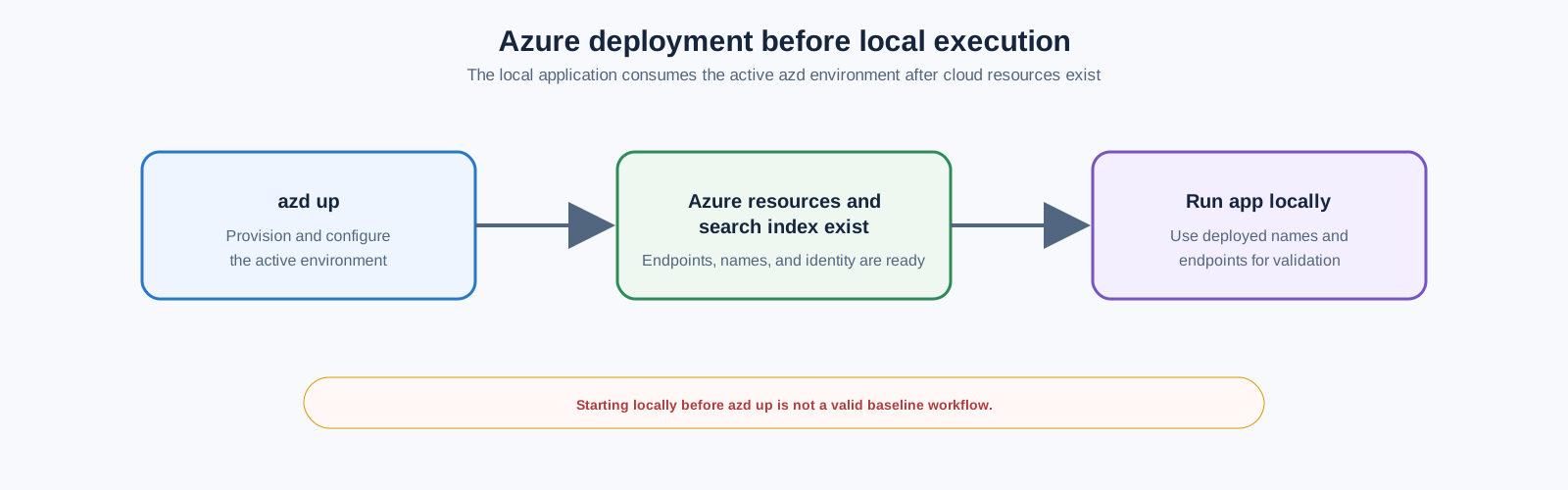
Starting the local application before completing azd up is not a valid baseline workflow.
The default deployment is publicly accessible
The default application does not require user authentication. Anyone with routable network access to the application endpoint can interact with the indexed content.
Do not load confidential enterprise data until authentication, authorization, and network controls are implemented.
azd up incurs charges immediately
The largest persistent cost is commonly Azure AI Search. Model deployments, Document Intelligence, storage, Container Apps, monitoring, and optional services also incur charges.
An interrupted deployment can still leave billable resources behind.
This is a sample, not a production certification
The repository provides a strong reference implementation. It does not eliminate the need for:
- threat modeling;
- data classification;
- privacy review;
- capacity planning;
- security architecture;
- operational readiness;
- model-risk governance;
- load testing;
- evaluation gates.
Target architecture
End-to-End Processing Flow
Deliverables
Retain the following evidence:
- Active
azdenvironment name - Source commit SHA
- Successful
azd upoutput - Azure resource inventory
- Working application endpoint
- One text retrieval result
- One vector retrieval result
- One hybrid retrieval result
- One citation opened successfully
- One non-streaming API response
- One streaming API response
- One custom document indexed successfully
- One Application Insights trace
- One evaluation summary
- One documented security or production gap
- Successful
azd downresult
Prerequisites
Azure permissions
Your identity requires:
Microsoft.Resources/deployments/writeat subscription scope;- permission to create or use a resource group;
- permission to write role assignments, such as:
- Owner;
- User Access Administrator; or
- Role Based Access Control Administrator;
- sufficient Azure OpenAI quota in an available region;
- permission to create Azure AI Search and supporting services.
If role-assignment permission exists only on a predefined resource group, use the repository's existing-resource deployment guidance instead of attempting subscription-wide provisioning.
Local tools
Install and validate:
- Azure Developer CLI
azd >= 1.23.6 - Azure CLI
- Python
3.10,3.11,3.12,3.13, or3.14 - Node.js
20or later - Git
- PowerShell
7or later on Windows - Visual Studio Code, recommended
Run:
azd version
az version
python --version
node --version
npm --version
git --version
On Windows:
pwsh --versionPass conditions:
- every command succeeds;
azdis at least1.23.6;- Node.js is at least version
20; - Python is in the supported range.
Recommended execution environment
Choose one:
- GitHub Codespaces
- VS Code Dev Container
- Local workstation
Codespaces or a Dev Container reduce workstation-specific dependency failures.
Cost decision
Choose one before deployment:
Standard lab profile
Use repository defaults:
- Azure Container Apps
- Basic Azure AI Search
- Azure Document Intelligence
- Application Insights
- vector and semantic retrieval enabled
Reduced-cost profile
Apply the optional settings in Section 11.
The reduced-cost profile is less capable. It is not a free equivalent of the default architecture.
Lab: Clone and Pin the Repository
Clone
git clone https://github.com/Azure-Samples/azure-search-openai-demo.git
cd azure-search-openai-demo
Check out the reviewed commit
git checkout 3f4a21f03ae3d565aca37cc300e3d38b0c7b582aVerify repository state
git rev-parse HEAD
git status
Expected SHA:
3f4a21f03ae3d565aca37cc300e3d38b0c7b582aExpected status:
HEAD detached at 3f4a21f
nothing to commit, working tree clean
Inspect the main structure
.
├── app/
│   ├── backend/
│   ├── frontend/
│   └── functions/
├── data/
├── docs/
├── evals/
├── infra/
├── scripts/
├── azure.yaml
└── README.md
Key areas:
| Path | Purpose |
|---|---|
app/backend | Quart API, RAG flow, ingestion code |
app/frontend | React and TypeScript UI |
app/functions | Cloud-ingestion custom skills |
data | Documents ingested by deployment scripts |
infra | Bicep modules |
scripts | Provisioning, ingestion, authentication, and ACL scripts |
evals | Quality and safety evaluation tooling |
docs | Advanced operating guidance |
Lab: Authenticate and Create an azd Environment
Authenticate Azure CLI
az login
az account list --output table
az account set --subscription "<subscription-id-or-name>"
az account show --output table
Authenticate Azure Developer CLI
azd auth loginIn a browser-restricted environment:
azd auth login --use-device-codeCreate an environment
azd env newUse a short, unique name:
raglab-jmThe environment is stored under:
.azure/<environment-name>/Confirm the active environment
azd env get-valuesDo not manually commit .azure environment files containing secrets.
Select Azure subscription explicitly
azd env set AZURE_SUBSCRIPTION_ID "<subscription-id>"Optional explicit resource-group name:
azd env set AZURE_RESOURCE_GROUP "rg-raglab-jm"If you do not set a resource group, the template generates one from the environment name.
Optional Reduced-Cost Configuration
Skip this section when using the standard lab profile.
Switch to App Service free tier
Edit azure.yaml:
services:
  backend:
    # host: containerapp
    host: appservice
Set:
azd env set DEPLOYMENT_TARGET appservice
azd env set AZURE_APP_SERVICE_SKU F1
Limitations:
- free-instance quotas apply;
- performance is lower;
- the free tier is not appropriate for production.
Use free Azure AI Search
azd env set AZURE_SEARCH_SERVICE_SKU freeLimitations:
- one free search service per subscription;
- semantic ranker unavailable;
- managed-identity capabilities are restricted;
- cloud ingestion and some advanced features are unsuitable.
Use free Document Intelligence
azd env set AZURE_DOCUMENTINTELLIGENCE_SKU F0The free service processes only the first two pages of a PDF.
For complete local PDF parsing:
azd env set USE_LOCAL_PDF_PARSER trueFor HTML:
azd env set USE_LOCAL_HTML_PARSER trueDisable vectors
azd env set USE_VECTORS falseThis removes embedding generation and vector retrieval. The result is a keyword-oriented RAG system with lower retrieval quality for semantic queries.
Disable Application Insights
Only use where supported by the chosen hosting target:
azd env set AZURE_USE_APPLICATION_INSIGHTS falseDisabling observability to save a small amount of money is usually a poor tradeoff.
Lab: Review Deployment Configuration
Validate azure.yaml
The source snapshot requires:
requiredVersions:
  azd: ">= 1.23.6"
Default backend host:
host: containerappThe deployment builds the frontend before packaging the backend.
Understand deployment hooks
azd up runs these phases:
Important consequence:
azd updoes more than infrastructure provisioning. It also ingests the files in ./data.
Inspect the planned values
azd env get-valuesAt this stage, many generated values do not exist yet. That is expected.
Lab: Provision and Deploy
Start deployment
azd upYou will be prompted for:
- primary Azure location;
- Azure OpenAI location;
- subscription, if not already fixed.
Choose regions according to:
- model availability;
- organizational data-residency policy;
- quota;
- supported optional features.
Observe the phases
Expected high-level sequence:
- Bicep validation
- resource-group creation
- Azure OpenAI and model deployment
- Azure AI Search creation
- storage and document-processing services
- Container Apps environment and application
- Azure Container Registry
- Application Insights and Log Analytics
- managed identities and role assignments
- sample document ingestion
- frontend build
- container deployment
- endpoint output
Do not stop at SUCCESS
The application container can require several additional minutes before it serves the correct application.
A temporary platform welcome page does not prove deployment failure.
Record the endpoint
Retain the endpoint printed by azd up.
Also inspect:
azd env get-valuesRecord the resource group
azd env get-value AZURE_RESOURCE_GROUPSet a shell variable on Linux/macOS:
RG="$(azd env get-value AZURE_RESOURCE_GROUP)"
echo "$RG"
PowerShell:
$RG = azd env get-value AZURE_RESOURCE_GROUP
$RG
Lab: Validate Provisioned Resources
Inventory resources
Linux/macOS:
az resource list \
  --resource-group "$RG" \
  --query "[].{Name:name,Type:type,Location:location}" \
  --output table
PowerShell:
az resource list `
  --resource-group $RG `
  --query "[].{Name:name,Type:type,Location:location}" `
  --output table
Expected categories include:
- Azure OpenAI or Foundry resource
- model deployments
- Azure AI Search
- Azure Storage
- Document Intelligence
- Container Apps
- Container Registry
- managed identities
- Log Analytics
- Application Insights
- Key Vault or supporting secret configuration
The exact set varies with feature flags.
Confirm model deployments
In Azure AI Foundry or the Azure portal, verify:
- chat deployment exists;
- embedding deployment exists;
- deployment state is successful;
- quota is non-zero.
Repository defaults at this snapshot:
Chat:       gpt-5.4-mini
Embedding:  text-embedding-3-large
Confirm the search index
Open:
Azure AI Search
  → Search management
  → Indexes
Verify:
- an index exists;
- documents are present;
- content fields are populated;
- embedding fields exist when vectors are enabled;
- source metadata exists.
Confirm blob content
Open the storage account and inspect the content container.
Verify that the sample documents were uploaded.
Confirm application health
Open the application endpoint.
Pass conditions:
- React UI loads;
- no Azure platform welcome page remains;
- chat page is visible;
- example questions appear;
- browser developer console has no repeated fatal errors.
Lab: Test the Application UI
Baseline grounded answer
Ask:
What is included in the Northwind Health Plus plan that is not in the standard plan?Validate:
- answer contains citations;
- source filenames are shown;
- clicking a citation opens a source document;
- answer is based on indexed content.
Multi-turn conversation
Ask:
Summarize the differences.Then:
Which option appears more suitable for someone expecting frequent specialist visits?Validate:
- conversational context is preserved;
- retrieved evidence remains visible;
- answer does not rely solely on earlier generated text.
Unsupported question
Ask a question unrelated to the sample corpus:
What was the closing price of Microsoft stock yesterday?Expected behavior:
- answer states that the indexed sources do not provide the information; or
- answer clearly qualifies the lack of support.
An authoritative unsupported answer is a failure.
Inspect thought process
Open the lightbulb or thought-process panel.
Record:
- original user query;
- generated search intent;
- returned search results;
- prompt sent for answer generation;
- model and retrieval settings;
- latency or token information when exposed.
The purpose is diagnosis, not disclosure to end users.
Lab: Compare Retrieval Strategies
Open Developer settings.
Use one fixed question for every test:
Which health plan provides broader coverage and what evidence supports that conclusion?Record results in this table:
| Mode | Semantic ranker | Top results | Correct answer | Useful citations | Notes |
|---|---|---|---|---|---|
| Text | Off | 3 | ☐ | ☐ | |
| Vector | Off | 3 | ☐ | ☐ | |
| Hybrid | Off | 3 | ☐ | ☐ | |
| Hybrid | On | 3 | ☐ | ☐ |
Text retrieval
Set:
retrieval_mode = text
semantic_ranker = false
Observe exact keyword sensitivity.
Vector retrieval
Set:
retrieval_mode = vectors
semantic_ranker = false
Observe semantic matching when the query does not use document wording.
Hybrid retrieval
Set:
retrieval_mode = hybrid
semantic_ranker = false
Observe combined lexical and vector results.
Hybrid plus semantic ranking
Set:
retrieval_mode = hybrid
semantic_ranker = true
semantic_captions = true
This is the repository's general quality-oriented baseline.
Acceptance criterion
Do not declare one mode superior from one question. Use at least five representative questions before drawing a conclusion.
Lab: Test the HTTP API
The application supports:
POST /chatfor JSON responses;POST /chat/streamfor NDJSON streaming responses.
Set the target:
APP_URL="https://<deployed-application-host>"For local execution later:
APP_URL="http://127.0.0.1:50505"Non-streaming request
Create request.json:
{
  "messages": [
    {
      "role": "user",
      "content": "What is included in the Northwind Health Plus plan that is not in the standard plan?"
    }
  ],
  "context": {
    "overrides": {
      "top": 3,
      "retrieval_mode": "hybrid",
      "semantic_ranker": true,
      "semantic_captions": true,
      "suggest_followup_questions": false,
      "use_oid_security_filter": false,
      "use_groups_security_filter": false,
      "vector_fields": "textEmbeddingOnly",
      "use_multimodal_answering": false
    }
  },
  "session_state": null
}
Call:
curl \
  --request POST \
  --url "$APP_URL/chat" \
  --header "Content-Type: application/json" \
  --data @request.json
Expected fields:
output_text
context
session_state
Inspect:
context.data_points
context.thoughts
Streaming request
curl --no-buffer \
  --request POST \
  --url "$APP_URL/chat/stream" \
  --header "Content-Type: application/json" \
  --data @request.json
Expected content type:
application/json-linesExpected event types include:
response.context
response.output_text.delta
Compare text and hybrid API calls
Change:
"retrieval_mode": "text"Run again, save the response, then change to:
"retrieval_mode": "hybrid"Compare:
- generated search query;
- retrieved source pages;
- answer completeness;
- citation correctness.
Authentication note
When Microsoft Entra authentication is enabled, API calls require:
Authorization: Bearer <ID-token>Do not disable authentication merely to simplify programmatic access.
Lab: Inspect the Search Index
List indexed source files
In Azure AI Search Search Explorer, run:
{
  "search": "*",
  "count": true,
  "top": 1,
  "facets": [
    "sourcefile"
  ]
}
Validate:
- total document chunk count;
- expected source filenames;
- no unintended confidential files.
Filter one file
{
  "search": "*",
  "count": true,
  "top": 5,
  "filter": "sourcefile eq 'employee_handbook.pdf'",
  "facets": [
    "sourcefile"
  ]
}
Replace the filename with one that exists in the index.
Test semantic query
{
  "search": "eye exams",
  "queryType": "semantic",
  "semanticConfiguration": "default",
  "queryLanguage": "en-us",
  "speller": "lexicon",
  "top": 3,
  "highlight": "content"
}
Inspect:
- rank order;
- highlighted text;
- semantic captions;
- source pages.
Lab: Understand the Ingestion Pipeline
The default local ingestion pipeline performs:
Default chunking behavior
At the source snapshot:
- approximately 1,000 characters per chunk;
- roughly 400–500 English tokens;
- approximately 10% overlap;
- sentence-aware boundary selection.
The algorithm is implemented in:
app/backend/prepdocslib/textsplitter.pyIndexed chunk structure
A chunk commonly includes:
id
content
category
sourcepage
sourcefile
storageUrl
embedding
Multimodal deployments can also include image fields and generated figure descriptions.
Lab: Replace Sample Data with Your Own Data
Use non-sensitive documents for this lab.
Back up the sample data
Linux/macOS:
mkdir -p data-sample-backup
cp -R data/. data-sample-backup/
PowerShell:
New-Item -ItemType Directory -Force data-sample-backup
Copy-Item -Recurse data\* data-sample-backup\
Remove current indexed documents
Linux/macOS:
./scripts/prepdocs.sh --removeallWindows:
./scripts/prepdocs.ps1 --removeallReplace files in data
Remove sample files and add your own supported documents.
Supported formats include:
- HTML
- DOCX
- PPTX
- XLSX
- JPG
- PNG
- BMP
- TIFF
- HEIF
- TXT
- JSON
- CSV
Re-ingest
Linux/macOS:
./scripts/prepdocs.shWindows:
./scripts/prepdocs.ps1The script:
- creates the index when necessary;
- uploads source files;
- extracts and chunks content;
- creates embeddings when enabled;
- indexes chunks.
Verify ingestion
Use Search Explorer:
{
  "search": "*",
  "count": true,
  "top": 1,
  "facets": [
    "sourcefile"
  ]
}
Ask corpus-specific questions
Prepare:
- three directly answerable questions;
- one multi-document question;
- one ambiguous question;
- one unsupported question.
Pass conditions:
- answerable questions cite correct documents;
- multi-document answer cites each relevant source;
- unsupported question is rejected or qualified.
Lab: Categorize Documents
Categories support filtered retrieval.
Ingest a category
Linux/macOS:
./scripts/prepdocs.sh --category "Architecture"Windows:
./scripts/prepdocs.ps1 --category "Architecture"Add the category to the UI
Update:
app/frontend/src/components/Settings/Settings.tsxAdd the category to the Include Category options.
Test filtering
Ask the same question with:
- all categories;
- only
Architecture.
Validate that filtered results contain only the intended category.
Lab: Run Locally
Local execution requires a successful Azure deployment.
Refresh authentication
azd auth loginStart the application
Linux/macOS:
./app/start.shWindows PowerShell:
./app/start.ps1The script:
- creates
.venv; - installs pinned backend requirements;
- installs frontend dependencies;
- builds the frontend;
- starts Quart with reload.
Default local endpoint:
http://127.0.0.1:50505Validate local application
Open:
http://127.0.0.1:50505Run the same baseline question used against Azure.
Use a different backend port
Linux/macOS:
PORT=50506 ./app/start.shPowerShell:
$env:PORT = "50506"
./app/start.ps1
Lab: Enable Frontend Hot Reload
Keep the backend running.
Open a second terminal:
cd app/frontend
npm run dev
Expected Vite endpoint:
http://localhost:5173Vite proxies backend requests to the Quart application.
Test
Modify a translation or UI label under:
app/frontend/srcValidate that the page updates without rebuilding the complete backend package.
Lab: Customize the UI
Frontend technologies:
- React
- TypeScript
- Fluent UI
- Vite
Localization files:
app/frontend/src/locales/<language>/translation.jsonExercise
Change:
- application title;
- header text;
- one example question;
- one instructional message.
Validate in the Vite development server.
Deploy code-only changes
When only app code changes:
azd deployDo not run a full infrastructure reprovision unnecessarily.
Lab: Customize the RAG Prompts
Primary implementation:
app/backend/approaches/chatreadretrieveread.pyPrimary prompts:
app/backend/approaches/prompts/query_rewrite.system.jinja2
app/backend/approaches/prompts/chat_answer.system.jinja2
app/backend/approaches/prompts/chat_answer.user.jinja2
Current flow
- Query rewrite through the Responses API
- Search through Azure AI Search
- Grounded answer through the Responses API
Exercise
Replace the sample healthcare-oriented system language with a domain-specific role, for example:
You are an enterprise cloud architecture assistant.
Answer only from the supplied sources.
Cite every factual statement.
When the sources do not support an answer, state that explicitly.
Distinguish mandatory standards from recommendations.
Validation set
Use the same five questions before and after the prompt change.
Compare:
- retrieval query quality;
- answer relevance;
- groundedness;
- citation coverage;
- unsupported-claim rate;
- response length.
Do not judge quality from one response. Model outputs can vary even at low temperature.
Lab: Make Retrieval Defaults Permanent
UI settings are request-time overrides and are not persistent.
Option A: Change frontend defaults
Find the retrieval state in the chat component and change the default from hybrid only when justified.
Example concept:
const [retrievalMode, setRetrievalMode] =
  useState<RetrievalMode>(RetrievalMode.Hybrid);
Option B: Enforce backend settings
In the approach implementation:
overrides = context.get("overrides", {})
overrides["retrieval_mode"] = "hybrid"
overrides["semantic_ranker"] = True
Backend enforcement is preferable when users must not weaken an approved configuration.
Security consideration
Remove the Developer settings interface in production if arbitrary retrieval or prompt controls are not appropriate for end users.
Lab: Optional Agentic Retrieval
Agentic retrieval uses a model to analyze the conversation and create retrieval plans.
Enable
azd env set USE_AGENTIC_KNOWLEDGEBASE trueKeep the default model or override it
Repository default:
gpt-5.4Explicit settings:
azd env set AZURE_OPENAI_KNOWLEDGEBASE_DEPLOYMENT knowledgebase
azd env set AZURE_OPENAI_KNOWLEDGEBASE_MODEL gpt-5.4
azd env set AZURE_OPENAI_KNOWLEDGEBASE_MODEL_VERSION 2026-03-05
Select reasoning effort
Default:
minimalOverride:
azd env set AZURE_SEARCH_KNOWLEDGEBASE_RETRIEVAL_REASONING_EFFORT lowSupported repository options:
minimal
low
medium
General tradeoff:
| Effort | Query planning | Latency | Token cost |
|---|---|---|---|
| Minimal | Limited single-intent flow | Lowest | Lowest |
| Low | Query planning and expansion | Higher | Higher |
| Medium | More exhaustive planning | Highest | Highest |
Deploy
azd upTest a multifaceted query
Compare the health plans for a family with recurring prescriptions, specialist visits, and expected hospital care. Identify tradeoffs and cite each claim.Inspect:
- generated query plan;
- number of searches;
- retrieved sources;
- token usage;
- answer quality;
- latency.
Compare against standard hybrid retrieval
Use the same query with:
- standard hybrid retrieval;
- agentic retrieval minimal;
- agentic retrieval low.
Do not adopt agentic retrieval without measuring whether quality gains justify additional latency and cost.
Optional web source
azd env set USE_WEB_SOURCE true
azd env set AZURE_SEARCH_KNOWLEDGEBASE_RETRIEVAL_REASONING_EFFORT low
Critical constraints:
- web source is incompatible with
minimal; - it changes answer-synthesis behavior;
- some UI controls become unavailable;
- public-web data has different privacy and contractual implications.
Lab: Optional Cloud Ingestion
Cloud ingestion uses Azure AI Search indexers and Azure Functions custom skills.
Use a new index
Cloud ingestion requires a different index schema.
azd env set AZURE_SEARCH_INDEX cloudindexEnable
azd env set USE_CLOUD_INGESTION trueIncrease embedding capacity when quota permits
azd env set AZURE_OPENAI_EMB_DEPLOYMENT_CAPACITY 400Provision and deploy
azd upCloud ingestion flow
Add a document
Upload a document to the configured blob data source.
Run the search indexer from Azure portal.
Validate
Check:
- indexer execution history;
- failed item count;
- function logs;
- newly indexed source filename;
- generated chunks.
Scheduled operation
Configure an indexer schedule only after defining:
- acceptable ingestion delay;
- retry behavior;
- failure alerting;
- document deletion semantics;
- cost constraints.
Lab: Monitoring and Tracing
Application Insights is enabled by default.
Open dashboard
azd monitorInspect request performance
In Application Insights:
Investigate
  → Performance
  → Select /chat or /chat/stream
  → Drill into samples
Inspect:
- total request duration;
- query-rewrite model call;
- Azure AI Search dependency;
- answer-generation model call;
- retry delay;
- HTTP status.
Inspect failures
Investigate
  → Failures
Filter by:
- operation name;
- result code;
- time range;
- cloud role.
Check throttling
Use Logs:
dependencies
| where resultCode == "429"
| summarize attempts=count(),
            affectedRequests=dcount(operation_Id)
            by target, name
| order by attempts desc
A request can eventually succeed after SDK retries while still suffering serious latency.
Protect prompt content
The OpenAI instrumentation can record prompts and responses.
For privacy-sensitive environments:
TRACELOOP_TRACE_CONTENT=falseApply it through the application environment in Bicep or the hosting configuration.
Do not enable content tracing for regulated or confidential prompts without formal approval.
Lab: Quality Evaluation
Evaluation dependencies conflict with the main application dependencies. Use a separate virtual environment.
Enable evaluation model
azd env set USE_EVAL true
azd env set AZURE_OPENAI_EVAL_DEPLOYMENT_CAPACITY 100
azd env set AZURE_OPENAI_CHATGPT_DEPLOYMENT_CAPACITY 100
azd provision
Repository default evaluation model at this snapshot:
gpt-5.4
version 2026-03-05
Create evaluation environment
Linux/macOS:
python -m venv .evalenv
source .evalenv/bin/activate
Windows:
python -m venv .evalenv
.evalenv\Scripts\Activate.ps1
Install dependencies
pip install -r evals/requirements.txtGenerate a small lab dataset
For a smoke test:
python evals/generate_ground_truth.py \
  --numquestions=20 \
  --numsearchdocs=200
For a serious baseline, use at least:
200 questionsReview:
evals/ground_truth.jsonlDelete unrealistic or invalid generated pairs.
Start the local application
In another terminal:
./app/start.shTarget:
http://localhost:50505Review evaluation configuration
Open:
evals/evaluate_config.jsonValidate:
- target URL;
- metrics;
- question file;
- result directory;
- model settings.
Run evaluation
python evals/run_evaluate.py --numquestions=20Summarize
cd evals
python -m evaltools summary results
Compare run to ground truth
python -m evaltools diff results/<run-directory>Compare two configurations
python -m evaltools diff \
  results/<baseline-run> \
  results/<candidate-run>
Evaluation acceptance rules
Do not approve a configuration solely from an aggregate average.
Review:
- worst-scoring questions;
- citation failures;
- unsupported claims;
- retrieval misses;
- long-tail latency;
- throttled requests;
- language-specific failures.
Lab: Safety Evaluation
Confirm region support
At the source snapshot, the repository lists safety simulation support in:
- East US 2
- France Central
- Sweden Central
- Switzerland West
- North Central US
This list can change. Verify platform support before deployment.
Run a small simulation
python evals/safety_evaluation.py \
  --target_url http://localhost:50505/chat \
  --max_simulations 20
The repository's larger default is:
200 simulationsReview output
safety_results.jsonMetrics include categories such as:
- hate and unfairness;
- sexual content;
- violence;
- self-harm.
Repository interpretation:
low_ratecloser to1.0is better;mean_scorecloser to0.0is better.
Inspect individual failures
Aggregate safety scores hide failure patterns.
Review the exact prompts and responses that produced the highest scores.
Lab: Enable Microsoft Entra Authentication
This section changes access behavior and may create two application registrations.
Required additional permission:
- ability to manage applications in Microsoft Entra ID.
Enable authentication
azd env set AZURE_USE_AUTHENTICATION trueSet tenant
azd env set AZURE_AUTH_TENANT_ID "<tenant-id>"If needed:
azd auth login --tenant-id "<tenant-id>"Deploy
azd upThe repository automation creates:
- a single-page client application registration;
- a confidential API application registration;
- API scopes and redirect configuration;
- application settings.
Validate
- application presents a sign-in flow;
- unauthenticated access is blocked;
- authenticated user can ask a question;
- browser token errors are absent;
- API endpoint rejects missing credentials.
Optional explicit user assignment
In the Enterprise Application:
Properties
  → Assignment required?
  → Yes
Assign only approved users and groups.
Lab: Enable Document-Level Access Control
Authentication alone does not restrict which indexed documents a user can retrieve.
Enforce access control
azd env set AZURE_ENFORCE_ACCESS_CONTROL trueEnable authentication
azd env set AZURE_USE_AUTHENTICATION trueSet tenant
azd env set AZURE_AUTH_TENANT_ID "<tenant-id>"Existing index only
python ./scripts/manageacl.py --acl-action enable_aclsA new index created during deployment can receive the access-control fields automatically.
Deploy
azd upTest with two users
Use:
- User A with access to document set A;
- User B without access to document set A.
Ask the same question as each user.
Pass condition:
- User B does not retrieve restricted chunks;
- citations do not expose restricted filenames;
- direct content URLs do not bypass authorization.
Optional global document access
azd env set AZURE_ENABLE_GLOBAL_DOCUMENT_ACCESS trueUse only when the access policy explicitly allows globally visible documents.
Do not enable unauthenticated access casually
azd env set AZURE_ENABLE_UNAUTHENTICATED_ACCESS trueThis weakens the access boundary and requires a clear policy for globally accessible content.
Lab: Optional User Upload
Prerequisites:
- authentication enabled;
- document-level access control enabled.
Enable:
azd env set USE_USER_UPLOAD true
azd up
Expected behavior:
- user documents stored in ADLS Gen2;
- user object ID used for directory ownership;
- indexed chunks contain authorization identifiers;
- retrieval checks ownership.
Test:
- User A uploads a document.
- User A can retrieve it.
- User B cannot retrieve it.
- unauthenticated user cannot access it.
Lab: Optional Persistent Chat History
Browser-only history:
azd env set USE_CHAT_HISTORY_BROWSER trueCosmos DB history:
azd env set USE_CHAT_HISTORY_COSMOS trueCosmos history requires authentication.
Test:
- create a conversation;
- sign out and use another browser or device;
- sign in;
- confirm the same user can retrieve history;
- confirm another user cannot retrieve it.
Do not store chat history indefinitely without a retention policy.
Lab: Optional Private Deployment
Private deployment adds material cost and operational complexity.
Configure
azd env set AZURE_USE_PRIVATE_ENDPOINT true
azd env set AZURE_USE_VPN_GATEWAY true
azd env set AZURE_PUBLIC_NETWORK_ACCESS Disabled
Provision
azd provisionThe initial post-provision ingestion is expected to fail before private-network connectivity is established.
Obtain VPN configuration link
azd env get-value AZURE_VPN_CONFIG_DOWNLOAD_LINKConfigure Azure VPN Client
The repository network design uses the DNS resolver address:
10.0.11.4Add it to the downloaded VPN XML only when the deployed network still matches the source snapshot.
Connect to VPN
Validate private DNS resolution for:
- Azure AI Search;
- Azure OpenAI;
- Storage;
- Container Apps or App Service;
- other enabled services.
Run post-provision ingestion
azd hooks run postprovisionDeploy application
azd deployValidate public isolation
From a device outside the private network:
- application endpoint must be inaccessible;
- service public endpoints must reject traffic.
Important incompatibility
The built-in CI/CD path is not directly compatible with the VPN-dependent private deployment. A self-hosted or network-integrated deployment runner is required.
Lab: Load Testing
Install Locust in a separate test environment:
python -m pip install locustStart:
locust ChatUserOpen:
http://localhost:8089Start conservatively:
Users:       20
Spawn rate:  1 user/second
Target:
https://<application-host>Do not end the target URL with /.
Measure:
- requests per second;
- p50, p95, and p99 latency;
- failure rate;
- HTTP 429 rate;
- Container Apps replica behavior;
- OpenAI token capacity;
- Search latency;
- CPU and memory.
A successful HTTP response after long automatic retries is not acceptable performance.
Lab: Production-Readiness Review
Identity
Required decisions:
- user authentication;
- application managed identity;
- least-privilege RBAC;
- document-level authorization;
- administrative separation;
- credential rotation.
Networking
Evaluate:
- private endpoints;
- private DNS;
- public network access;
- egress controls;
- API Management;
- WAF;
- corporate network connectivity;
- deployment-runner network access.
Search capacity
The default Basic service and free semantic-ranker allowance are development settings.
For standard semantic ranking:
azd env set AZURE_SEARCH_SEMANTIC_RANKER standardFor a larger search tier:
azd env set AZURE_SEARCH_SERVICE_SKU standardChanging between some tiers requires a new service and reindexing.
OpenAI capacity
Default capacity is not a production sizing result.
Evaluate:
- average prompt tokens;
- average output tokens;
- query rewrite calls;
- answer calls;
- agentic-retrieval planning calls;
- expected requests per minute;
- burst pattern;
- retry behavior.
Container Apps
The sample can scale to zero.
For production, consider:
- minimum two replicas;
- sufficient CPU and memory;
- dedicated workload profile;
- zone resilience;
- readiness probes;
- deployment revisions;
- safe rollback.
Storage
Consider zone-redundant storage rather than local redundancy.
Observability
Define:
- logs retained;
- traces sampled;
- prompt content recorded or suppressed;
- alert thresholds;
- dependency-failure alerts;
- evaluation dashboards;
- cost alerts.
Data governance
Define:
- permitted document classifications;
- ingestion approval;
- source ownership;
- deletion SLA;
- index refresh SLA;
- geographic residency;
- retention;
- legal hold;
- user-upload policy.
AI quality gates
Require:
- retrieval test set;
- answer-quality test set;
- citation-matching threshold;
- groundedness threshold;
- safety threshold;
- regression comparison;
- human review of worst cases.
Validation
| Test | Expected result | Pass |
|---|---|---|
| Tool versions | Meet repository minimums | ☐ |
| Source commit | Exact reviewed SHA | ☐ |
| Azure authentication | Correct subscription and tenant | ☐ |
azd up | Completes successfully | ☐ |
| Resource inventory | Expected services exist | ☐ |
| Chat deployment | Ready and has capacity | ☐ |
| Embedding deployment | Ready and has capacity | ☐ |
| Search index | Contains chunks | ☐ |
| Blob storage | Contains source files | ☐ |
| Azure UI | Loads correctly | ☐ |
| Grounded answer | Uses valid citations | ☐ |
| Unsupported question | Refused or qualified | ☐ |
| Text retrieval | Tested | ☐ |
| Vector retrieval | Tested | ☐ |
| Hybrid retrieval | Tested | ☐ |
| Semantic ranker | Tested | ☐ |
/chat API | Returns JSON | ☐ |
/chat/stream API | Returns NDJSON | ☐ |
| Custom document | Indexed successfully | ☐ |
| Local app | Runs on port 50505 | ☐ |
| Frontend HMR | Runs on port 5173 | ☐ |
| Application Insights | Trace visible | ☐ |
| Evaluation | Results produced | ☐ |
| Safety evaluation | Results reviewed | ☐ |
| Authentication | Enabled when required | ☐ |
| Access control | Prevents unauthorized retrieval | ☐ |
| Cleanup | Resource group deleted | ☐ |
Troubleshooting
azd version rejected
Upgrade Azure Developer CLI.
Verify:
azd versionRequired:
>= 1.23.6Role-assignment failure
Typical cause:
Microsoft.Authorization/roleAssignments/writeis missing.
Fix:
- obtain Owner, User Access Administrator, or RBAC Administrator;
- use a permitted existing resource group;
- use existing resources with preconfigured identities and roles.
Model region unavailable
The region prompt is constrained by current model availability.
Fix:
- verify quota;
- select another region;
- use an approved existing model deployment;
- change model name, version, or SKU only to supported combinations.
azd up succeeds but app shows welcome page
Wait several minutes and refresh.
Then inspect Container Apps revision and logs.
Search returns no results
Check:
- index document count;
prepdocsoutput;- Blob files;
- embedding deployment;
- Search RBAC;
- index name in active
azdenvironment.
Citation opens 404
Check:
- source file exists in storage;
sourcepageandsourcefilemetadata;- content route authorization;
- blob permissions;
- filename encoding.
Local app lacks settings
Run:
azd env get-valuesConfirm the current terminal is in the correct repository and active environment.
Reauthenticate:
azd auth login
az login
Local port occupied
Linux/macOS:
PORT=50506 ./app/start.shWindows:
$env:PORT = "50506"
./app/start.ps1
Evaluation is extremely slow
Check:
- chat deployment capacity;
- evaluation deployment capacity;
- hidden HTTP 429 retries;
- number of LLM-based metrics;
- number of questions.
Do not compare latency from throttled and non-throttled runs.
Changed embedding model but index fails
Embedding dimensions are part of the search schema.
Create a new index:
azd env set AZURE_SEARCH_INDEX new-index-name
azd up
Do not reuse an index with incompatible vector dimensions.
Cloud ingestion does not work on existing index
Cloud ingestion requires its schema.
Create a new index before enabling it:
azd env set AZURE_SEARCH_INDEX cloudindex
azd env set USE_CLOUD_INGESTION true
azd up
Authentication redirect failure
Check:
- tenant ID;
- client and server app registrations;
- redirect URIs;
- SPA registration;
- admin consent;
access_as_userscope;- known client application configuration.
HTTP 429 responses
Increase capacity only after determining which deployment is throttled.
Possible sources:
- query rewrite model;
- answer model;
- embedding model;
- evaluation model;
- agentic retrieval model.
Cleanup
Save evidence
Export:
- evaluation summary;
- important screenshots;
- architecture decisions;
- environment configuration without secrets.
Delete Azure resources
azd downConfirm:
Delete all resources: y
Permanently purge resources when supported: y
Verify the resource group
az group exists \
  --name "$(azd env get-value AZURE_RESOURCE_GROUP)"
Expected:
falseIf the azd environment no longer returns the name, verify in the Azure portal or use the recorded resource-group name.
Remove local environments
Linux/macOS:
rm -rf .venv
rm -rf .evalenv
rm -rf app/frontend/node_modules
Windows:
Remove-Item -Recurse -Force .venv -ErrorAction SilentlyContinue
Remove-Item -Recurse -Force .evalenv -ErrorAction SilentlyContinue
Remove-Item -Recurse -Force app\frontend\node_modules -ErrorAction SilentlyContinue
Remove test Entra applications
When automatic authentication setup created lab-only application registrations, confirm whether azd down removed them.
Delete remaining lab registrations manually when necessary.
Verify no billable resources remain
Check:
- resource groups;
- Azure AI Search;
- model deployments;
- Container Registry;
- Log Analytics;
- App registrations;
- soft-deleted or purge-protected resources.
Operational considerations
- Use a dedicated, budget-controlled environment with an accountable lab owner and expiry date.
- Keep the reviewed repository commit, model versions, deployment configuration, and evaluation dataset with the lab evidence.
- Monitor search capacity, model tokens and throttling, Container Apps consumption, registry, storage, and telemetry cost throughout execution.
- Treat prompts, uploaded files, retrieved passages, citations, traces, chat history, and evaluation results according to their data classification.
- Require explicit review before enabling anonymous access, user upload, persistent history, agentic retrieval, public endpoints, or cross-region processing.
- Re-run security, retrieval, quality, and load validation after changing models, embeddings, prompts, chunking, index schema, identity, or network topology.
- Do not promote the sample directly to production; close the production-readiness findings through governed architecture and release processes.
Appendix A — Model Configuration
Change chat deployment name
azd env set AZURE_OPENAI_CHATGPT_DEPLOYMENT "<deployment-name>"Change model
azd env set AZURE_OPENAI_CHATGPT_MODEL "<model-name>"Change model version
azd env set AZURE_OPENAI_CHATGPT_DEPLOYMENT_VERSION "<version>"Change deployment SKU
azd env set AZURE_OPENAI_CHATGPT_DEPLOYMENT_SKU GlobalStandardChange capacity
azd env set AZURE_OPENAI_CHATGPT_DEPLOYMENT_CAPACITY 30After infrastructure changes:
azd upOld model deployments are not necessarily deleted automatically.
Appendix B — Embedding Configuration
Use text-embedding-3-small
azd env set AZURE_OPENAI_EMB_MODEL_NAME text-embedding-3-small
azd env set AZURE_OPENAI_EMB_DIMENSIONS 1536
azd env set AZURE_OPENAI_EMB_DEPLOYMENT_VERSION 1
Use text-embedding-3-large
azd env set AZURE_OPENAI_EMB_MODEL_NAME text-embedding-3-large
azd env set AZURE_OPENAI_EMB_DIMENSIONS 3072
azd env set AZURE_OPENAI_EMB_DEPLOYMENT_VERSION 1
Changing the embedding model or dimension requires a new compatible search index and re-ingestion.
Appendix C — Key Feature Flags
| Variable | Effect |
|---|---|
USE_VECTORS | Enables vector embeddings and vector retrieval |
USE_AGENTIC_KNOWLEDGEBASE | Enables Azure AI Search agentic retrieval |
USE_CLOUD_INGESTION | Enables indexers and Azure Functions ingestion |
USE_EVAL | Provisions evaluation model |
AZURE_USE_AUTHENTICATION | Enables Microsoft Entra login |
AZURE_ENFORCE_ACCESS_CONTROL | Applies document-level filtering |
AZURE_ENABLE_GLOBAL_DOCUMENT_ACCESS | Permits globally visible documents |
AZURE_ENABLE_UNAUTHENTICATED_ACCESS | Allows anonymous application access |
USE_USER_UPLOAD | Enables authenticated document uploads |
USE_CHAT_HISTORY_BROWSER | Stores history in browser |
USE_CHAT_HISTORY_COSMOS | Stores persistent history in Cosmos DB |
AZURE_USE_PRIVATE_ENDPOINT | Deploys private endpoints |
AZURE_USE_VPN_GATEWAY | Deploys VPN access path |
AZURE_PUBLIC_NETWORK_ACCESS | Enables or disables public service access |
USE_MEDIA_DESCRIBER_AZURE_CU | Describes figures with Content Understanding |
USE_SPEECH_INPUT_BROWSER | Enables browser speech input |
USE_SPEECH_OUTPUT_AZURE | Enables Azure Speech output |
ENABLE_LANGUAGE_PICKER | Enables language selector |
Appendix D — Code Map
| Component | Path |
|---|---|
| API routes and application setup | app/backend/app.py |
| RAG approach | app/backend/approaches/chatreadretrieveread.py |
| Query rewrite prompt | app/backend/approaches/prompts/query_rewrite.system.jinja2 |
| Answer system prompt | app/backend/approaches/prompts/chat_answer.system.jinja2 |
| Answer user prompt | app/backend/approaches/prompts/chat_answer.user.jinja2 |
| Ingestion entry point | app/backend/prepdocs.py |
| Text splitter | app/backend/prepdocslib/textsplitter.py |
| Search index manager | app/backend/prepdocslib/searchmanager.py |
| React frontend | app/frontend/src |
| Deployment definition | azure.yaml |
| Main Bicep | infra/main.bicep |
| Quality evaluation | evals/run_evaluate.py |
| Ground-truth generation | evals/generate_ground_truth.py |
| Safety evaluation | evals/safety_evaluation.py |
| Load test | locustfile.py |
Appendix E — Recommended Enterprise Extensions
- Add API Management with identity-based backend access.
- Add WAF and controlled ingress.
- Use private endpoints and centralized private DNS.
- Store no reusable secrets in application settings.
- Use workload identity and managed identity.
- Add tenant and document authorization tests to CI.
- Add ingestion malware scanning.
- Add source-content classification and approval.
- Add prompt-injection detection and source-trust rules.
- Add citation-verification metrics.
- Add retrieval and answer regression datasets.
- Add cost budgets and quota alerts.
- Add model-deployment failover or routing.
- Add release gates for quality and safety.
- Add data deletion and reindexing runbooks.
- Add restore testing for storage, configuration, and indexes.
- Add explicit SLOs for latency, availability, and answer quality.
- Add dependency scanning and signed container images.
- Add incident response for harmful or unauthorized output.
- Remove end-user developer controls not approved for production.
Appendix F — Source Map
Primary repository sources used for this lab:
README.md
azure.yaml
docs/README.md
docs/architecture.md
docs/localdev.md
docs/data_ingestion.md
docs/customization.md
docs/http_protocol.md
docs/deploy_features.md
docs/deploy_lowcost.md
docs/agentic_retrieval.md
docs/login_and_acl.md
docs/monitoring.md
docs/evaluation.md
docs/safety_evaluation.md
docs/deploy_private.md
docs/productionizing.md
app/start.sh
app/backend/app.py
app/backend/requirements.txt
Related topics
- Azure OpenAI Platform Architecture
- Enterprise RAG and AI Search
- AI Security, Identity, and Responsible AI
- Production Operations for AI Applications
Related repos
- Azure-Samples/azure-search-openai-demo — provides the application, infrastructure, ingestion, evaluation, and security examples used by this lab at the pinned source commit recorded in the metadata.